
Upgrading your home theater to a 4K projector or buying a next-gen gaming console is an exciting investment. However, many enthusiasts encounter a frustrating problem when running cables across a large room: flickering screens, audio dropouts, or simply “No Signal.”
The culprit is rarely the hardware; it is almost always the cable. When transmitting high-resolution data over distances exceeding 5 meters (15 feet), traditional copper wires hit a physical wall. This is where a
The Distance Problem: Copper vs. Optical
Whether you are watching a movie or playing a fast-paced game, modern displays require an immense amount of data.
-
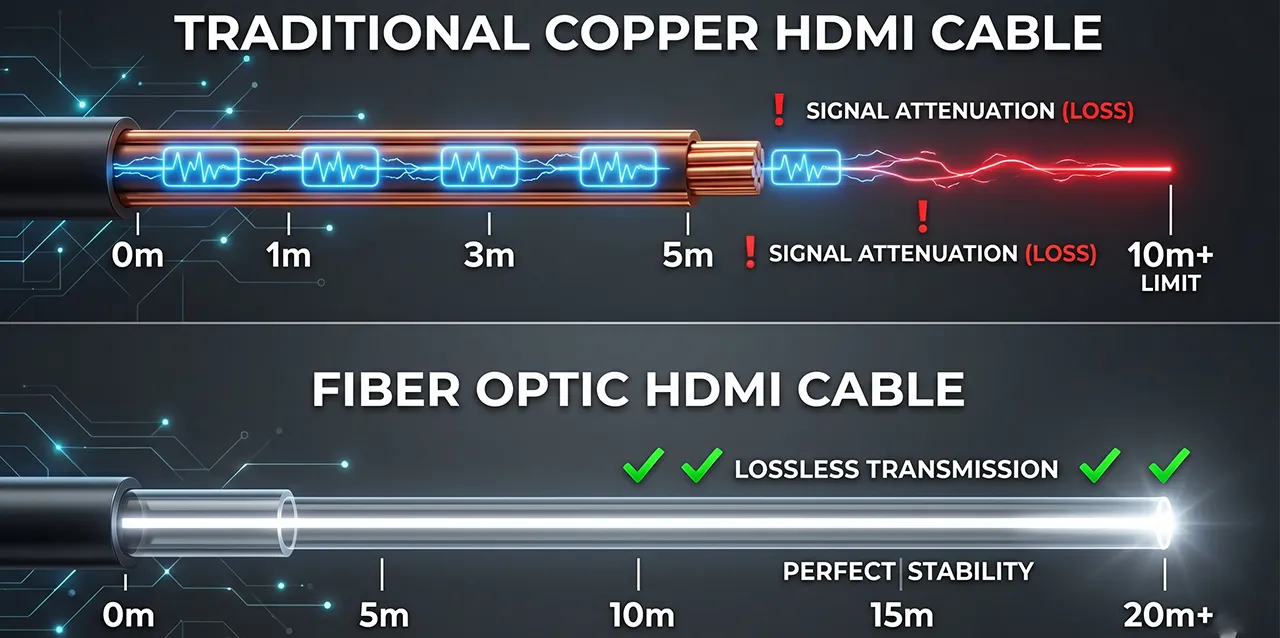
The Copper Limitation: Traditional copper cables use electrical currents to send data. Over short distances, they work perfectly. But copper suffers from
signal degradation (attenuation) -
The Optical Solution: A fiber optic HDMI cable solves this physics problem by using light. Microchips integrated into the cable heads convert the electrical audio/video signals into pulses of light. These optical signals travel down ultra-pure glass strands at the speed of light, resulting in zero signal degradation—even at 20 meters or more.
Why the 2.1 Specification is the Only Choice to Make
While you can find older generation optical cables on the market, future-proofing your setup is critical. If you are going through the effort of running a fiber optic HDMI cable through your walls or ceiling, it must feature the
Here is why the 2.1 standard is the gold standard for optical connections:
-
Massive 48Gbps Bandwidth: The 2.1 spec pushes 48 Gigabits per second, which is necessary for flawless uncompressed 8K@60Hz and 4K@120Hz viewing. Older 2.0 cables cap out at 18Gbps.
-
Gaming Enhancements: Only the 2.1 specification supports crucial features like VRR (Variable Refresh Rate) and ALLM (Auto Low Latency Mode), ensuring gamers get tear-free, zero-lag performance across a 15-meter or 20-meter run.
-
eARC Support: Enhanced Audio Return Channel (eARC) requires the bandwidth of a 2.1 cable to send uncompressed, high-bitrate audio formats like Dolby Atmos directly from your TV back to your soundbar or AV receiver.
Quick Comparison: HDMI 2.0 vs. HDMI 2.1
| Feature | HDMI 2.0 Specification | HDMI 2.1 Specification |
| Max Bandwidth | 18 Gbps | 48 Gbps |
| Video Resolution | 4K at 60Hz | 4K at 120Hz & 8K at 60Hz |
| Gaming Features | None | VRR, ALLM, QFT |
| Audio Return | ARC (Compressed audio) | eARC (Uncompressed audio) |
| HDR Support | Static HDR | Dynamic HDR |
Crucial Installation Tips for In-Wall Wiring
Because a fiber optic HDMI cable contains delicate glass strands and photoelectric microchips in the connector heads, it requires more care during installation than a standard copper wire.
-
Test Before You Pull: This is the golden rule. Always connect the cable to your source and display to test the 4K/120Hz signal on the floor before you run it through the walls.
-
Verify Directionality: Ensure the “Source” end is at your AV receiver/console and the “Display” end is at your TV/Projector. Routing it backward means you will have to tear it out and start over.
-
Proper Conduit Sizing and Pulling: Tape your pull-string securely to the cable jacket just behind the connector. Additionally, ensure your wall conduit is wide enough (at least 1 to 1.5 inches) to accommodate the HDMI connector head without forcing or wedging it.
-
Respect the Bend Radius: Maintain a gentle, rounded curve (typically a 1.5 to 2-inch radius) around corners to prevent fracturing the internal glass fibers.
Partner with Gcabling for Premium Connectivity
If your display is far away from your source device, do not risk your viewing experience on standard wiring. Upgrading to a premium fiber optic HDMI cable is the only guaranteed way to achieve pristine, lag-free video.
As a leading HDMI cable supplier, Cabos G engineers professional-grade Active Optical Cables (AOC). Our HDMI 2.1 cables deliver true uncompressed 48Gbps bandwidth, ultra-flexible glass fibers for easy in-wall installation, and 100% immunity to electromagnetic interference. Explore our advanced AV solutions today and build an infrastructure that will last for generations.
Perguntas mais frequentes
Q: Is a fiber optic HDMI 2.1 cable backward compatible with older HDMI 2.0 TVs?
A: Yes, absolutely. HDMI 2.1 is fully backward compatible. If you connect an HDMI 2.1 optical cable to an older HDMI 2.0 TV or AV receiver, it will simply operate at the maximum capabilities of that older hardware. Buying a 2.1 cable now ensures you won’t need to rip cables out of your wall when you upgrade your TV in the future.
Q: Does a fiber optic HDMI cable cause input lag for gaming?
A: No. In fact, light travels faster than electricity. The photoelectric conversion process inside the cable heads takes less than a microsecond, making the latency virtually zero. When combined with the HDMI 2.1 VRR (Variable Refresh Rate) feature, gamers will experience flawless, tear-free visuals with absolutely no noticeable input lag.
Q: Do I need an external power adapter to use a fiber optic HDMI cable?
A: No external power supply is needed. The active microchips located inside the cable heads draw the tiny amount of power they require directly from the standard HDMI port on your connected devices (specifically using the 5V pin). It is a clean, true plug-and-play solution.

 Portuguese
  English
  Spanish
  Arabic